
Connecting Telegram Bot
Telegram Bot connects with an API token from @BotFather — no tie to a personal account, no QR code. AISAR registers the bot's webhook and receives its messages into a shared inbox, and any agent on the team can reply. Here's how to get the token and get through the setup.
What you'll need
- A Telegram bot created via @BotFather, and its API token — if the bot doesn't exist yet, you can create it during the connect flow itself (steps below).
- Awareness that a bot can have only one webhook: if it's already wired into another system, connecting it to AISAR redirects its incoming updates here.
- Access to my.aisar.app and the Settings → Channels section of the right company.
Where to find it
In my.aisar.app open Settings → Channels → Add channel, find the Telegram Bot card in the catalog, and click Connect.
How to connect
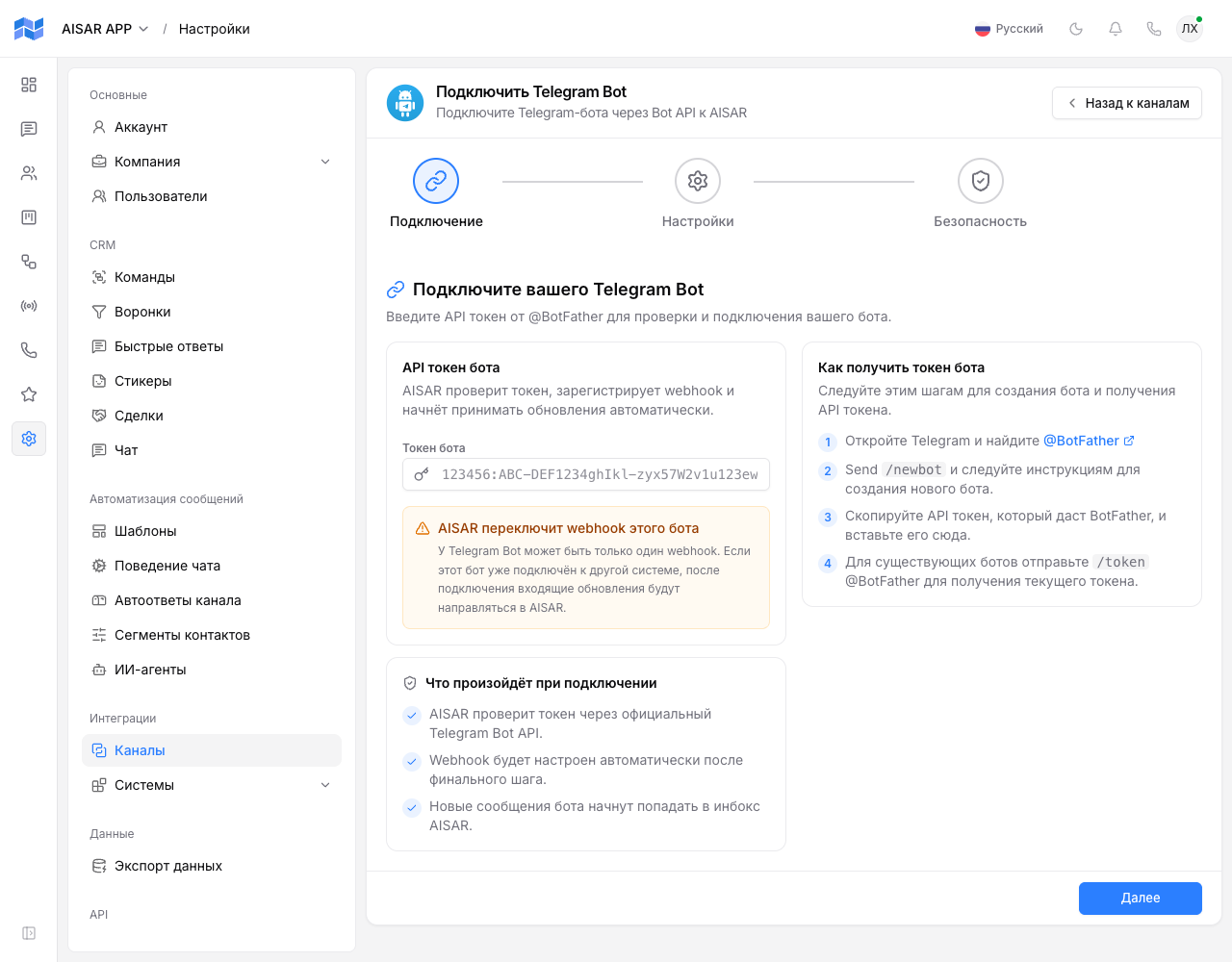
- Click Connect on the Telegram Bot card — the "Connect Telegram Bot" wizard opens, with three steps in an unusual order: Connect first, then Settings, then Security.
- If you don't have a bot yet: open Telegram, find @BotFather, send it
/newbot, and follow the prompts — it hands back an API token. For an existing bot, send it/tokento get the current one. - On the Connect step, paste the token into the Bot token field and click Next.
- On the Settings step, enter a Channel name (required), optionally a Description, and pick a Timezone.
- On the Security step, choose which teams can see this channel, and whether it allows broadcasts, automations, and inbound message handling.
- Click Connect bot — AISAR verifies the token through the official Telegram Bot API, sets the webhook up automatically, and creates the channel with Connected status.
How to check the channel is working
In the channel list (Settings → Channels), Telegram Bot shows the Connected status. Send the bot a message from Telegram — it should show up in AISAR's Chat section within a few seconds, and a reply sent from AISAR should arrive from the bot.
Common issues
| Symptom | Cause and what to do |
|---|---|
| The wizard rejects the bot token | Check the token was copied in full, without stray spaces or line breaks — the format is 123456:ABC-DEF…, exactly as @BotFather issues it. If unsure, send @BotFather the /token command and copy a fresh one. |
| The bot stopped responding in another system after connecting to AISAR | Expected: a bot can have only one webhook, and AISAR took it over. If the bot is still needed in the previous system, create a separate bot for AISAR via @BotFather. |
| The plan channel limit is reached when trying to connect Telegram Bot | Your company's plan caps how many channels can be connected at once. Disconnect an unused channel, or raise the limit with an extra-channel add-on in Billing. |
| The bot does not reply to some Telegram users | Under Telegram's own rules, a bot can only message a user after that user has messaged the bot first (or followed a special deep link) — this is Telegram's limit, not AISAR's. |
See also
Need a channel tied to an employee's personal account instead of a separate bot? See Connecting Telegram. Channel features and pricing are on aisar.app/en/channels/telegram-bot.