
CRM blocks in scenarios: find, read a field, delete
How a scenario finds a contact or a deal, saves a field value into a variable, moves the found deal to another stage and deletes a deal or a contact. Who can add these blocks and what the reasons in the run history mean.
What the blocks do
The blocks work with the AISAR CRM: contacts, deals, organizations and the custom fields of contacts, conversations and organizations. They do not search or change anything in Bitrix24 or amoCRM directly. If your deals sync with Bitrix24, changes made by a scenario reach it the same way as edits from the cabinet. A deletion reaches Bitrix24 or amoCRM only if the integration card says what to do on deletion, and a scenario never deletes anything there for good (see below).
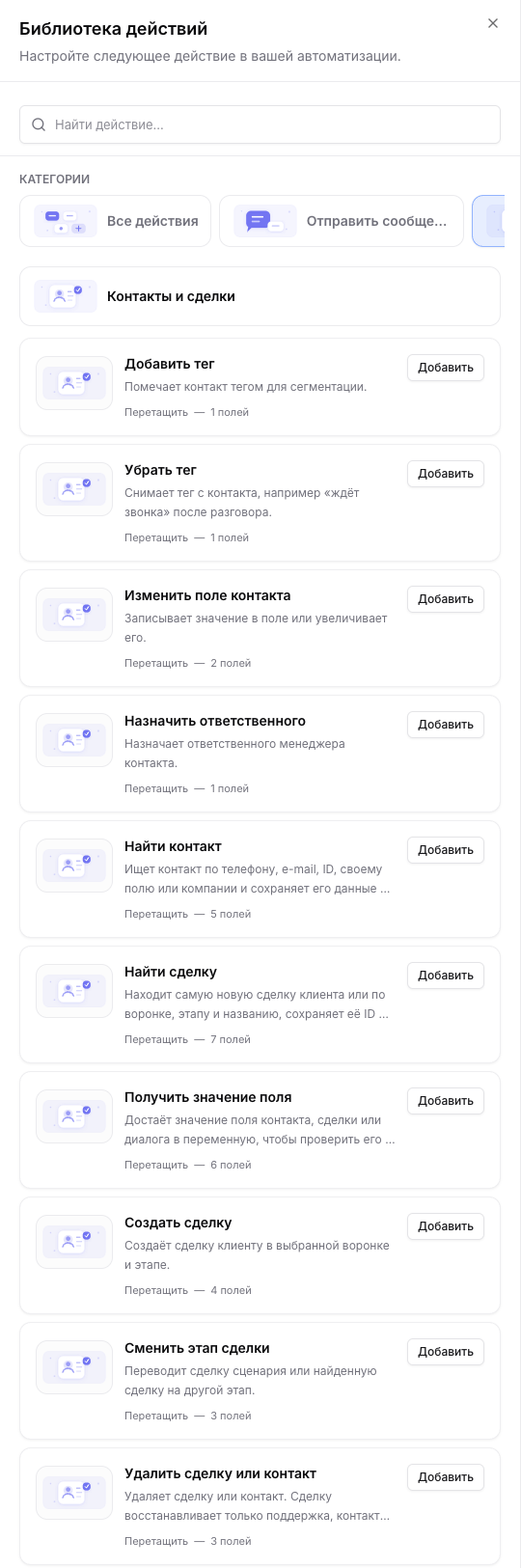
In the scenario editor the blocks are in the action library, in the "Contacts and deals" category:
| Block | What it does | Exits |
|---|---|---|
| Find contact | Looks a contact up by phone, e-mail, ID, a custom field or company and saves its ID and fields into variables. | Found, Not found, Failed |
| Find deal | Finds the newest deal of the client, or one by funnel, stage and title, and saves its ID and fields into variables. | Found, Not found, Failed |
| Find organization | Looks an organization up by tax number, name, ID or a custom field and saves its ID and fields into variables. | Found, Not found, Failed |
| Get field value | Saves the value of one field of a contact, a deal, a conversation or an organization into a variable. | Found, Not found, Failed |
| Delete deal or contact | Deletes the scenario deal or contact, or one found by ID. | Deleted, Not found, Failed |
| Create deal | Creates a deal for the scenario client in the chosen funnel and stage. | one exit |
| Move deal stage | Moves the scenario deal or a found deal to another stage. | one exit |
| Remove tag | Removes a tag from the contact, for example "waiting for a call" after the call. | one exit |
A found contact does not become the scenario client. Messages, waits for a reply and "Update contact field" still work with whoever started the scenario. Take the found one by ID in the next blocks: "Find deal", "Get field value", "Move deal stage" and "Delete".
Who can add the blocks
A scenario cannot do more than the person who built it. So besides the right to edit scenarios, some blocks need rights on the deals and contacts themselves:
| Block | What the employee needs |
|---|---|
| Delete a deal | The right to delete deals and the "All" level for deals in the role. |
| Delete a contact | The right to delete contacts and access to all channels of the company. |
| Find deal, Get field value of a deal | The right to view deals and the "All" level for deals. |
| Find contact, Get field value of a contact by ID | The right to view contacts and access to all channels of the company: the search covers all contacts. |
| Move deal stage | The right to edit deals. For a deal by ID also the "All" level for deals. |
| Create deal | The right to create deals. |
| Find organization, Get field value of an organization | The right to view organizations. For the organization of the scenario deal also what reading a deal needs. |
- Without the right the block card is visible in the library but unavailable, and a hint explains what is missing. The company administrator always passes.
- Rights are checked across the whole scenario and the scenarios it goes to, when it is saved, switched on, switched to another version, started as a live test or a safe dry run, and when the inbound webhook settings are changed. An employee without the right cannot re-save a scenario that already has such a block, but can remove the block.
- A company constant used in CRM blocks can be created, changed or deleted only by someone who could build those blocks themselves. Otherwise a constant could change what an administrator's scenario deletes.
- A scenario that is already on keeps working if its author's rights are cut later. After changing roles, review the scenarios with a delete block.
How rights and the "All" level are set up: Roles and permissions.
Find contact
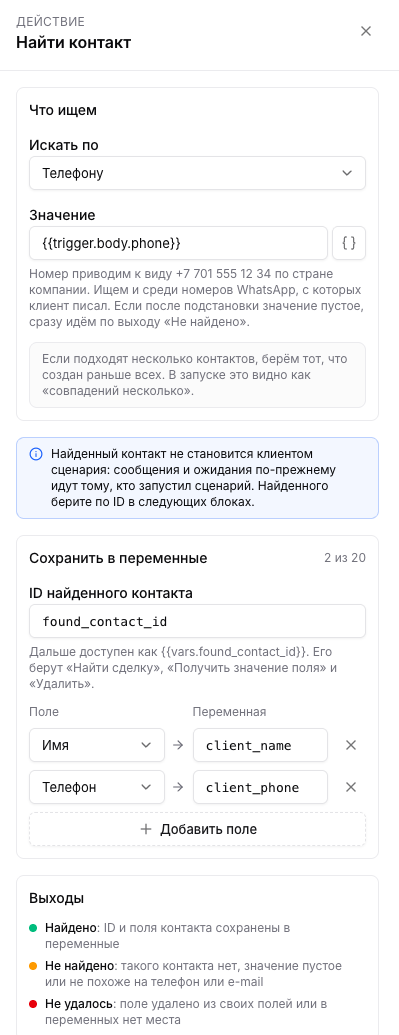
In the block pick what to search by and fill in "Value": text or a variable such as {{trigger.body.phone}} from an inbound webhook.
| Search by | How it compares |
|---|---|
| Phone | The number is brought to the +7 701 555 12 34 form by the company country, so 8 701 555 12 34 is found too. WhatsApp numbers the client wrote from are searched as well. If the value does not look like a phone, there is no search and the exit is "Not found". |
| Case-insensitive: Aliya@Mail.kz matches aliya@mail.kz. | |
| Contact ID | Digits only. A contact of another company is never found. |
| Own contact field | Equality, case-insensitive. Multi-choice lists and long text cannot be searched. |
| Company | The text of the "Company" field in the contact card, case-insensitive: "Mebel Plus LLP" matches "mebel plus llp". |
| Organization ID | Contacts of this organization, usually {{vars.found_organization_id}} from the "Find organization" block. A deleted organization or one of another company is never found. |
- If the value is empty after the placeholders are filled in, the block goes straight to the "Not found" exit.
- If several contacts match, the one created first is taken. The run shows it as "several matches".
- The ID of the found contact is saved into a variable,
found_contact_idby default. Further on it is available as{{vars.found_contact_id}}. - In "Save into variables" you can take up to 20 contact fields at once: a "Field" and a "Variable" per row. If the contact is not found, these variables are cleared so the next blocks do not pick up an old value.
Find deal
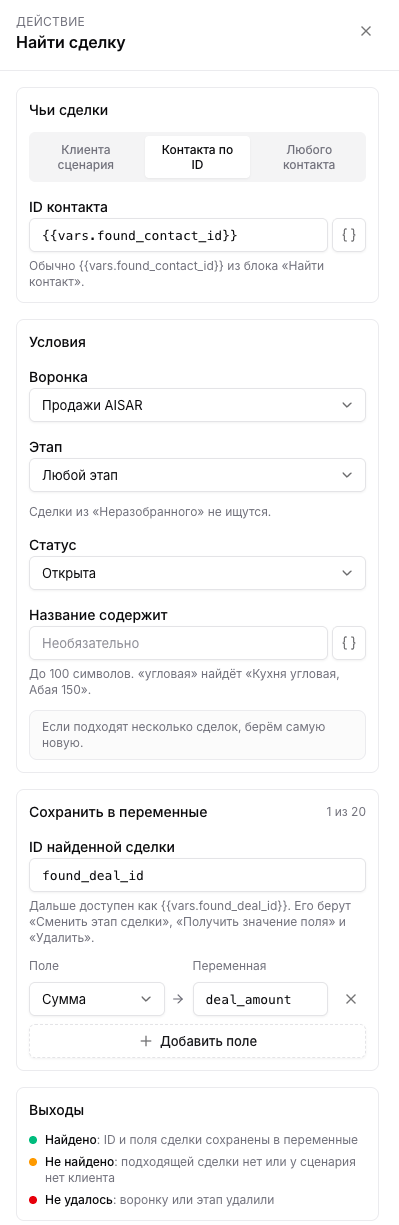
- "Whose deals": the scenario client, a contact by ID (usually
{{vars.found_contact_id}}from "Find contact") or any contact. For any contact you must set a funnel, a stage or a part of the title, otherwise the block would find a random deal of the company. - Conditions: funnel and stage (any is fine), status ("Open" by default, also "Won", "Lost", "Any") and "Title contains", up to 100 characters. "corner" finds "Corner kitchen, Abay 150".
- If several deals match, the newest one is taken. Deals in "Unsorted" are not searched.
- The ID of the found deal is saved into
found_deal_id, and the deal fields can be saved into variables the same way as for a contact.
Find organization
The block looks up a CRM organization of your company. Pick what to search by and fill in "Value", for example {{trigger.body.tax_number}} from an inbound webhook.
| Search by | How it compares |
|---|---|
| Tax number | Spaces, dashes and dots are dropped, so 1234 5678 9012 matches 123456789012. If the value does not look like a tax number (3 to 32 Latin letters and digits), there is no search and the exit is "Not found". |
| Name | The whole name, case-insensitive. |
| Organization ID | Digits only. An organization of another company is never found. |
| Own organization field | Equality, case-insensitive. Multi-choice lists and long text cannot be searched. |
- If several organizations match, the one created first is taken. The run shows it as "several matches".
- The ID of the found organization is saved into
found_organization_idand is then available as{{vars.found_organization_id}}. "Save into variables" can take organization fields: name, tax number, relation type, requisites, the responsible employee and custom fields. The blocks never read bank accounts. - The found organization is not linked to the scenario client. Find its contacts with "Find contact" by organization ID.
Get field value
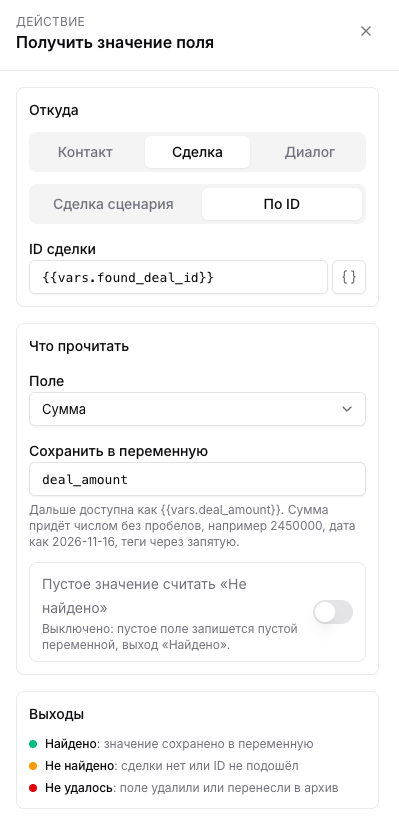
The block reads one field into a variable so you can check it in a condition or insert it into a message. "From": a contact, a deal or a conversation, the scenario one or by ID (for a conversation only the scenario one), or an organization: the scenario client's, the scenario deal's or by ID. "What to read": built-in fields (name, phone, owner, amount, stage, funnel, lost reason and others) and custom fields of contacts, conversations and organizations.
- An amount comes as a number without spaces, for example
2450000, a date as2026-11-16, tags separated by commas. So a conditionvars.deal_amount greater than 100000works right away. - For conditions on an organization's relation type use the "Relation type (code for conditions)" field: for the starter types it is
customer,partnerand other keys, and it does not change when the type is renamed. For the company's own types the code is empty; compare the "Relation type" field with the name instead. - By default an empty field gives the "Found" exit and an empty variable. Turn on "Treat an empty value as "Not found"" if an empty field needs its own branch.
Delete deal or contact
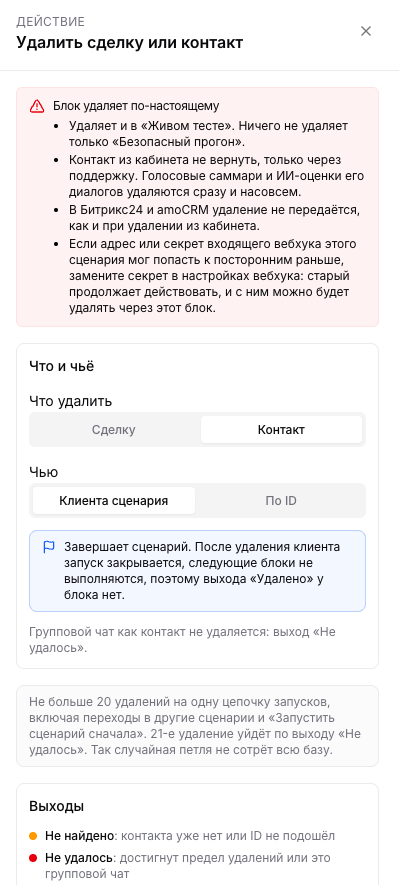
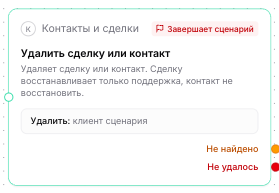
In the block choose "What to delete" (a deal or a contact) and "Whose": the scenario one or by ID. The ID usually comes from a find block: {{vars.found_deal_id}} or {{vars.found_contact_id}}.
- The deletion is soft. The record disappears from lists but is not wiped from the database. A deal can be restored: through the API with
POST /v1/deals/{id}/restore(needs the right to delete deals, see REST, deals) or through support. There is no deals trash screen in the cabinet yet. - A contact cannot be restored from the cabinet, only through support. Voice summaries and AI scores of its conversations are deleted at once and for good, same as when a contact is deleted by hand.
- The deletion reaches Bitrix24 and amoCRM only if this is turned on in the integration card. By default "Do nothing" is selected there, and the CRM record stays as it is. The company administrator picks the mode on the "Sync" tab of the integration card. The deletion reaches the CRM after the record is deleted in AISAR, through a queue, not instantly.
- A scenario never deletes in the CRM for good. Even with the "Delete in Bitrix24" mode, a deal deleted by a scenario is closed as lost in the portal, and a contact gets a comment. Only an employee who deleted a single record in the web cabinet deletes for good. The comment says the record was deleted by a scenario and gives its name. Modes, limits and the pause are described in Connecting Bitrix24.
- amoCRM. The amoCRM integration card has an "If a contact was deleted in AISAR" setting on the "Sync" tab: "Do nothing", or adding the "Deleted in AISAR" tag. The tag is added next to the other contact tags, together with a note saying who deleted the contact and when. The tag makes such contacts easy to find and sort out by hand. An integration cannot delete a contact in amoCRM: amoCRM does not allow it. AISAR deals are not passed to amoCRM, so there is no setting for them. If another AISAR contact that is not deleted is linked to the same amoCRM card, the tag is not added. If more than 100 contacts were deleted within an hour, passing deletions is paused the same way as in Bitrix24, and the administrator lifts the pause with the "Resume" button.
- Deleting the scenario client ends the scenario. The run is closed and the next blocks do not run, so such a block has no "Deleted" exit and is marked "Ends the scenario" on the canvas. The same happens if the contact deleted by ID is the one that started the scenario. The run history shows "Contact deleted, scenario ended".
- No more than 20 deletions per chain of runs, "Go to scenario" and "Restart scenario" included. Deletion number 21 takes the "Failed" exit. This way an accidental loop does not wipe the whole base.
- The block does not delete a deal in "Unsorted", and a group chat is not deleted as a contact: in both cases the exit is "Failed".
- The
deal.deletedandcontact.deletedwebhooks are sent the same way as for a deletion from the cabinet.
An ID from an inbound webhook
If the ID to delete comes from the body of an inbound webhook, for example {{trigger.body.deal_id}}, then whoever sends the request decides what is deleted. Do this only if the webhook address and secret are known to your own system alone. Do not attach such a scenario to an address with the secret inside that is visible in a website form's HTML.
An old secret keeps working after CRM blocks are added to the scenario. If the address or secret may have reached outsiders before (a former employee or a contractor, say), click "Replace secret" in the webhook settings and update it in your system. How the inbound webhook works: Webhook scenario trigger.
Create a deal, move a stage, remove a tag
- Create deal: funnel and stage (the first stage of the funnel by default), title and amount, variables allowed. In "If the client already has an open deal" choose "Do not create a new one" or "Create one more". The deal is created for the scenario client, the owner is taken from the client card.
- Move deal stage: which deal (the scenario deal or by ID, usually
{{vars.found_deal_id}}) and where to move it. The scenario deal is the deal the scenario started with; if it did not start with a deal event, the conversation deal, and if there is none, the newest open deal of the client. If there is no deal or it is in "Unsorted", the step is skipped and the scenario goes on; the reason is shown in the run. - Remove tag: set the tag and the block removes it from the scenario client.
Four ready-made chains
A website request moves a deal
- Trigger "Webhook / API", the client phone in the request body.
- "Find contact" by phone
{{trigger.body.phone}}. - From "Found": "Find deal" of the contact by ID
{{vars.found_contact_id}}in the "Sales" funnel, status "Open". - From "Found": "Move deal stage" by ID
{{vars.found_deal_id}}, for example to "Paid".

A large deal goes straight to the manager
"Find deal" of the scenario client, in "Save into variables" the "Amount" field → deal_amount. Then "If / Else branch" with the condition vars.deal_amount greater than 100000, and on the "Yes" branch "Notify team" for the manager.
A spam contact is deleted
Trigger "New message", an "If / Else branch" condition on the spam text, and on the "Yes" branch "Delete deal or contact": contact, the scenario client. The scenario ends there. Start with a narrow condition and check it on a few real messages: a deleted contact cannot be restored from the cabinet.
A contact by company name
"Find contact" by company "Romashka LLP", in "Save into variables" the "Name" field → boss_name. Then "Send to chat" with a text like "A request came in for {{vars.boss_name}}".
Deleting a deal in the cabinet and "Deal updated" scenarios
Previously, deleting a deal in the cabinet, including bulk deletion, started scenarios with the "Deal updated" trigger on the deal being deleted. Now a deletion does not start them: a scenario on a deleted deal could not do anything useful with it anyway. If an external system needs to react to a deal deletion, subscribe to the deal.deleted webhook.
Reasons in the run history
If a block took the "Not found" or "Failed" exit, the reason is shown on the scenario "Runs" tab: open the run and the block step. Field values are never written to the history, only IDs and the reason.
| Reason | Exit | What it means and what to do |
|---|---|---|
| Nothing matched | Not found | No matching contact or deal. |
| Nothing to look for | Not found | The value is empty after the variables are filled in. Check that the request field or the variable is filled. |
| Phone not recognised, E-mail not recognised | Not found | The value does not look like a number or an e-mail address, no search was run. |
| The ID did not fit | Not found | Something other than a number came instead of an ID. |
| The run has no client | Not found | The scenario started without a contact, on a schedule for example. Search by ID. |
| No deal | Not found | The client has no open deal, and the scenario did not start with a deal event. |
| No dialog | Not found | The scenario started without a conversation. |
| No organization | Not found | The client or the deal has no organization, the organization was deleted, or the ID belongs to another company. |
| Number not recognized | Not found | After substitution the value does not look like a tax number, no search was run. |
| The field is empty | Not found | "Treat an empty value as "Not found"" is on. |
| The block is not fully set up | Failed | A setting is missing. Open the block and check the fields. |
| Field not found, The field is archived | Failed | The field was deleted, or the custom field was archived. Restore it or pick another one. |
| The field cannot be searched | Failed | Multi-choice lists and long text are not compared in a search. |
| The funnel or stage is gone | Failed | The funnel or stage from the block settings was deleted. Pick others. |
| The value is too long | Failed | After the placeholders are filled in the value is too long, for example "Title contains" over 100 characters. |
| No room for variables | Failed | The run already has 50 variables or 64 KB of values. Save only the fields you need. |
| The search took too long | Failed | The database did not answer within 3 seconds. Narrow the search. |
| The delete limit is reached | Failed | 20 deals or contacts have already been deleted in the chain of runs. Check whether the scenario loops. |
| The deal is in "Unsorted" | Failed | The block does not delete such deals. Sort the deal first. |
| This is a group chat | Failed | A group chat is not deleted as a contact. |
| The step did not run | Failed | An internal error. Write to support and give the run number. |
See also
How scenarios work: Automations. Variables and constants: Variables, constants and buttons in scenarios. Contacts, deals and funnels: Contacts and deals. Custom fields and AI access to them: Custom fields.